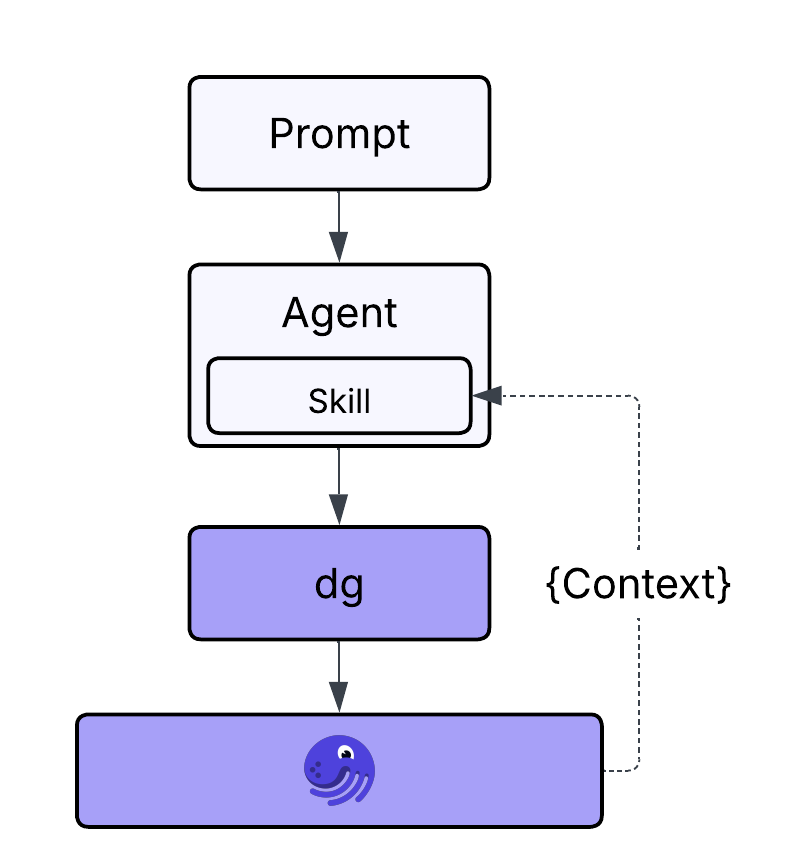
How a skill works
Before we look at using the dagster-expert skill, it helps to know what a skill is and how the agent uses it.
What skill files look like
A skill is a structured document (often a SKILL.md or similar file) that your coding agent can load when it sees a relevant trigger, such as typing /dagster-expert or mentioning "Dagster" in the prompt. The skill file typically includes:
- When to use the skill: triggers, slash commands, or intent phrases (e.g. "create a Dagster project", "add a schedule").
- Instructions: what to do first (e.g. use
dgfor scaffolding, rundg check defsafter changes). - References: pointers to CLI commands, project layout, and patterns (e.g. use
uvx create-dagster, put assets underdefs/assets/, useDuckDBResourcefromdagster-duckdb).
The agent doesn't "run" the skill like a script; it reads the skill as context and uses that to decide which commands to run and how to structure code.
How skills are used
When you invoke the skill (e.g. /dagster-expert create a new Dagster project called university):
- The interface or agent matches your prompt to the skill (e.g. "dagster-expert" or "Dagster project").
- The skill's content is added to the context sent to the model.
- The model follows the skill's instructions: use
dgand the recommended layout, rundg check defsafter scaffolding, add dependencies withuv, etc.
So the same high-level request ("create a project", "add three assets") leads to different, more opinionated behavior when the skill is active: the agent prefers dg over hand-written structure and validates with dg check defs. In Lesson 4, we'll see that in practice by creating the project with the skill.